Yearly Archives: 2007

Telepresence in the air

Marc Andreessen’s blog today mentioned this cool demo:

This uses video goggles with a head-tracking sensor to remotely control the orientation of a camera mounted on a pilot-less plane, letting you virtually explore the heavens.

Apart from the general wow-factor of flying around the sky without ever leaving the ground, it reminded me of another piece of impressive technology I came across recently: quad-copters.

Here, a high-speed DSP is used to combine realtime feedback from gyros and sensors on position, wind direction, etc. to control four rotating blades independently allowing for stationary hovering in a wide range of conditions with no pilot input required. Great for remote video surveillance etc.

Combining these two pieces of technology seems like a perfect opportunity. Has anyone done it yet?

And a missing piece of the puzzle: even using stereo cameras to feed the video goggles, the image will still be flat since there is no way to remotely focus it (other than relying on auto-focus). Has anyone developed a set of video goggles that can track the eye’s ability to focus on specific objects? Combine that with a pair of remote cameras that can track the eye’s focus in that way and you could have REAL telepresence (once the latency isn’t too high, of course).

Isn’t it great that we live in an age where such amazing technology is affordable enough to let people devise interesting hacks in their spare time…?

Turn any surface into a touchscreen

Thanks to Kieran for pointing me towards this impressive Wii Remote hack, covered by Engadget here.

Johnny Chung Lee has done a marvellously simple hack which uses the standard Wii remote controller, plus some ballpoint pens modified to emit infra red, to convert any surface into an interactive touch-screen. With multiple pens, you can support multi-touch effects (as seen on the iPhone and iPod Touch), and previously mentioned on this blog back in March 2006.

Here’s an example of his technique in use:

(Make sure you watch the video long enough to see the technique in action; it’s very impressive, especially when combined with a video projector.)

Johnny’s software to make all this work is free, and available here.

OpenSocial: now facebook is for everyone

Marc Andreessen’s always-interesting blog today talks about OpenSocial, a new standard spear-headed by Google which aims to provide a common API for embedding new web content and apps across all the main social network sites.

This is very similar to the Facebook Platform API launched a few months ago to critical acclaim, but with the significant difference that OpenSocial is an open standard which pretty much everyone else except Facebook is jumping on the bandwagon to support.

Marc’s blog does a much better job of describing the benefits than I can. In a nutshell, though, it means that if you run a website that offers a useful service, you can now easily allow it to be embedded in any of the main social networking sites (LinkedIn, Friendster, Ning, etc.) by just adding some basic HTML & Javascript support.

This should be fun…

(The official Google launch is tomorrow, at which point http://code.google.com/apis/opensocial should become operational.)

Seam Carving & Tiny First Person Shooters

My friend James was impressed by the Tilt-shift photography I mentioned in the previous post, and sent me some related material.

Seam carving is an image resizing technique which works by identifying horizontal and vertical seams with low information content and then removing them, rather than simply removing pixels according to a fixed scaling algorithm.

This means that the proportions of important items within the picture are maintained. The same technique can be adapted to increase the size of an image (especially in a single dimension) without making it look skewed. And more intriguingly, by first marking parts of the image as “low value”, you can seamlessly erase elements of a picture automatically — no Photoshop expertise required.

This YouTube video does a good job of describing it:

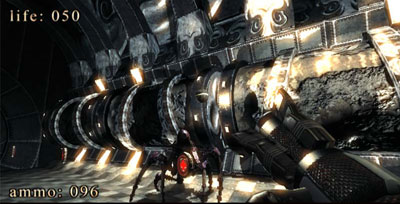
Not content with this, James also pointed me towards .kkrieger, a simple 3D shoot-em-up with an impressive twist: the executable size is less than 100 KB. (Yes, that’s Kilobytes). The program would have easily fitted onto a standard 170 KB floppy disk from the Commdore 64 era 25 years ago!

Despite this, the game has pretty decent graphics and sound, not dissimilar to Doom, as this screenshot shows:

Screenshot from .kkrieger

The amazingly small file size is achieved by generating all textures algorithmically at runtime. This leads to long, though not excessive load times.

To download the game or read more about it, visit the main .kkrieger website.

Tilt-Shift Photography

When I had a film camera 15 years ago, I took almost no photographs with it: about one roll of film per year, on average. Then I got a digital camera, and since then I’ve taken a ridiculous number of photos – currently around 36,000 and climbing.

So, while I wouldn’t call myself a big photography buff, I do have a passing interest in photography techniques and methods.

No doubt that’s why my friend Steve sent me a link to this website, which describes Tilt-Shift photography, a style that makes normal scenes look like they are in miniature:

We’re used to looking at photos where everything is in focus (to infinity) so when the depth of field is restricted, the brain is tricked into it’s a model scene. The effect is quite surreal!

Check out the website mentioned above for more information.

Windows Vista select-all bug

I’ve been using Windows Vista for a few months now, and am still finding that for every nice new feature I like, there is a change of behaviour or missing element that I dislike just as much. Ah, progress…

Last night, however, I encountered a new bug which is both minor and infuriating: the ability to select multiple files in Windows Explorer vanished. Using the mouse to drag-out a selection box, holding down Shift or Control, and even trying to choose Select All from the Edit menu are all disabled. It’s hard to describe just how annoying it is not to have this simple capability.

It turns out this is a well known Vista bug, first reported back in the Vista Beta days, and there are three solutions. Two are well-documented, the third is much more difficult to find. Naturally, the third solution was the one that I needed.

For convenience, here they are (in order of simplicity).

1. Go into Tools -> Folder Options -> Views and choose Reset Folders (also available under “Organise -> Folder & Search Options”. You may need to do this from within multiple Explorer Windows before it finally works.

2. Alternatively, run RegEdit and delete all keys under this one:

HKCU\Software\Classes\Local Settings\Software\Microsoft\Windows\Shell

(i.e. Bags, BagsMRU, and MuiCache) in their entirety. Do this with no Windows Explorer windows open; ideally, with Windows Explorer killed in Process Manager before you delete the keys.

3. When neither of the above two methods works, run this FixSingleSelect VBScript and it will sort it out – at least, it did for me.

I’m frankly stunned that Microsoft have (a) allowed a bug with such wide-spread impact to make it through to final release, and (b) not issued a patch to address the problem.

Fixing Windows XP’s sluggish behaviour

ICPUG is one of the oldest computer organisations in the UK, having recently celebrated its 25th anniversary. Almost every year since around 1992, I’ve attended the annual ICPUG computer weekend at the Queens Armes hotel in the village of Charmouth on the Dorset coast.

I’m just back from this year’s event, which was as entertaining as ever (talks ranged from helicopters to pure maths to safe-cracking in Nigeria, and there was even some computing thrown in for good measure). One of the most useful things I came away with, however, was a simple Windows XP that can dramatically improve responsiveness on many systems.

The Start menu on XP has a Documents sub-menu that conveniently lists the last 10 or so documents which have been worked on – very handy if you want to go back and edit a recent file. XP creates this menu from the most recent document shortcuts from the hidden ‘Recent’ folder in your User profile.

However, XP has no mechanism to automatically empty the Recent folder; instead, the more folders, files and documents you open, the more shortcuts accumulate here. On my own system, there were about 1600 shortcuts listed (including many duplicates), dating back to 2004.

Simply emptying out this folder can produce a notable improvement in response speed for things like opening new browser windows, double-clicking document files, and even opening disk folders. I tried it on my system, and the effect was immediate – it felt as fast as a brand new XP installation again.

Because the folder is hidden, the easiest way to get to it is to select Run from the Start menu, then enter:

%HOMEPATH%\Recent

as the command to run. This will open the Recent folder and you can see how many shortcuts are listed. Then a simple Select All followed by Delete will get rid of them for once and for all.

Credit for this tip must go to Brian Grainger, webmaster of the ICPUG UK site; thanks Brian!

(As a final footnote, the Queens Armes has been sold to new owners as of May 24, 2007, and I believe the name will be changing to Abbotsville or Abbotshead.)

Google Apps / Digital Ethnography

Last night, I attend the monthly meeting of SAGE-IE, the Systems Administrators Guild of Ireland (old website here).

The evening’s talk was on Google Apps, presented by Sam Johnston and Laurent Gasser of Microcost. I had only been peripherally aware of Google Apps, so I figured it would be a good chance to find out some more.

Sam & Laurent both gave engaging and enthusiastic presentations. Microcost is in the business of helping enterprises to move their internal services (e-mail, calendar/scheduler, collaborative document editing, etc.) to Google Apps, with the potential for both large cost savings and significant improvements in productivity.

Some random interesting titbits I took away from the evening:

  • Total cost of upgrading a corporate workstation to Windows Vista is estimated as €2,500 (Microsoft estimate) to €5,000 (independent estimate). This is enough to provide the same user with 50-100 years of Google Apps service. (Google Apps are $50 per user per year for a premium subscription).
  • Microcost use Amazon’s S3 to store enterprise’s back-end data, with another service encrypting the data to/from Amazon (to address any potential privacy concerns). Not clear to me how this interfaces with Google Apps, since this was glossed over.
  • There are significant productivity gains from having proper, shared document editing. When documents always live in the cloud, anyone (with appropriate authorisation) can access them from anywhere, anytime. Multiple users editing the same document can arrive at a final version much more quickly and effectively than the more traditional route of swapping Word and Excel files via email.
  • A big advantage of online apps, such as Google Apps, is that upgrades can happen completely seamlessly without the user having to do anything. Upgrades are small and frequent, rather than large and infrequent. Since everyone using the app is updated simultaneously, there is more scope for making fundamental changes to the underlying code without having to be as concerned with backwards compatibility.
  • One audience member was concerned that organisations could become dependent on certain functionality which might then disappear in a future release, with no control or comeback. Laurent conceded that this was a possibility for individual users, who may grow attached to some particular quirk of the system, but less likely to affect enterprises where Google (or whoever) track user preferences closely.
  • There was also some concern over whether organisations would be willing to move all their data into the cloud. Another audience member commented that larger organisations are already used to giving up control of some or most of their data, by way of internal data centres and outsourced IT support, so they don’t see it as a big leap. For smaller companies, this is a more significant hurdle.
  • Laurent mentioned that in over a year of using Google Apps, he has yet to find any signficant bugs or stability concerns. I think this is key: Google tend to make very reliable and solid web apps, which instill confidence in the user. They have a lot of experience building fault-tolerant systems. If the execution is less than 100%, I expect most users would lose confidence very quickly indeed.

Also, as an aside, Sam mentioned that Trinity College recently announced that they will be moving all student email to Gmail. He expects most other colleges to follow in their footsteps.

The presentation finished off with a look at Mike Wesch’s recent Digital Ethnography video which puts a lot of the Web 2.0 stuff into context. I hadn’t seen this before (though it’s been creating quite a buzz), and it’s well worth watching – download the 67 MB high-resolution version for the best experience.

Server room on a chip

Jon Stokes from ArsTechnica has a good article on Intel’s recently announced Terascale 80-core processor.

When you have so much processing power available, how do you make best use of it? One way is to treat it as a virtual server room, and run virtual machines on each core. For example, a heavily trafficed website, which is traditionally spread across multiple web & database servers, could be hosted completely on a single piece of silicon, with corresponding cost and power savings (especially power).

Then there’s the problem of how to keep such a fast chip adequately supplied with data, to ensure it doesn’t spend too much idle time waiting for new packets to arrive. There are some hints that Intel may be about to announce on-chip optical support.

I doubt we’ll see this technology on the desktop any time soon (though you never know), but in an era where datacentres are routinely sucking up megawatts of power, it’s useful to have a potential glimpse of a future where the entire room may be reduced to a single server cabinet.

(Let’s ignore storage, for now…)

Compaq’s Problematic ProLiant

For the past month, I’ve been upgrading the hard disk on a friend’s Compaq ProLiant ML-370 server (first generation). I finally completed the job on Friday.

Why so long? Surely a hard drive upgrade is a five minute job? Well usually, yes. However, Compaq have gone to some trouble to make it difficult.

The old server had two 18 GB UltraSCSI drives, and had run out of space. The plan was to add a cheap, large IDE drive to provide additional data storage, while retaining the SCSI drives for Windows 2000 and Microsoft Exchange Server. Thus, a 160 GB Maxtor IDE drive was purchased.
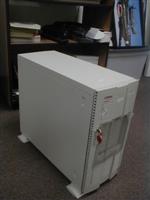
Compaq's ProLiant serverFirst problem: the ProLiant has an internal IDE interface, but it does not support hard drives! The BIOS actually says this when you try to configure it – or it would if there was a BIOS, which there isn’t. Instead, you have to download a four floppy disk System Configuration Utility from Compaq’s website. In this day and age, even finding four working floppy disks (not to mention a working floppy drive, in a server that has been actively sucking in dust for almost five years) is a challenge in itself.

(Later on, I discovered you can also download the SmartStart 5.50 CD to do the same thing; there are later versions available but they don’t support the ML-370 G1).

Anyway, ignoring what the BIOS said, I connected the IDE drive to the internal IDE interface and booted up. Windows found the drive okay, decided to limit it to 137 GB capacity (despite running SP4, and enabling the enhancement to support 48-bit LBA addressing). No matter, we could live with 137 GB.

What we couldn’t live with was the speed – appallingly slow, and with 100% CPU utilisation whenever the drive was accessed. A quick visit to Device Manager confirmed that the interface was running in PIO mode – Programmed I/O – rather than using UltraDMA which is much, much faster. Apparently this is one of the limitations of the Compaq IDE interface (and probably the reason why they don’t support IDE drives).

Next bright idea: add an internal PCI IDE card. A cheap ITE 8212 non-RAID card was duly ordered and installed, and the card’s onboard BIOS had no problem detecting all 160 GB of the drive — great! “Non-system disk or disk error” — not so great!

I couldn’t find any way to tell the IDE card’s BIOS (or the Compaq System Configuration Utility) to avoid trying to boot off the attached IDE drive. There is a boot priority order, but this ignores plug-in IDE cards and only pays attention to the onboard SCSI and IDE controllers. Upgrading the Compaq system Flash to the latest supported version didn’t help matters.

Next step: disable the IDE controller card entirely in the SCU and let Windows 2000’s Plug & Play mechanism configure it instead. For a while, it looked like this would work: Windows correctly detected the card and installed the latest drivers, which I had downloaded from their website. However, it point blank refused to find any drives attached to the card. (I knew the drive was there since the BIOS had correctly spotted it earlier.)

After much googling, and reading discussion threads from others who had tried and failed to get an IDE drive going in a ProLiant, I was almost ready to give up. However, there was one thing left to try: a different IDE controller card.

After a little research, I came across the MRI RAID IDE Controller which is based on a Silicon Image/CMD SiI0680 chipset, rather than ITE. After it arrived, I swapped out the ITE card for the new one, disabled it in the SCU, and once again let Windows Plug & Play figure it out.

And this time … it worked! CMD’s IDE drivers must be a bit more robust/adaptable than the ITE drivers, since it had no trouble at all detecting the hard disk. Better yet, it recognised the full 160 GB of drive space.

Compaq have always made PCs that were almost but not quite completely compatible with normal PCs. While the ProLiant series have many fine attributes, incidents such as this help explain why I will never, ever, buy a Compaq server myself.