If you’re in the EU, you qualify for free enrolment for Windows 10 Extended Support Updates (ESU). (Other territories may have to pay a fee). This is useful if you are running Windows 10 on hardware that won’t support Windows 11, or you just want to stay on Windows 10 for compatibility or other reasons.
Enroling is easy – you just go to Windows 10 Updates as usual, and you should see a warning that support for updates has failed. There’ll be an Enrol link you can click to sign up. The only condition is that you need to either create or use an existing Microsoft.com account when signing up. (This won’t take over your local login account on Windows 10; it’s only used for updates).
I did all of this two months ago on our main family computer and it was working well. Then recently, I fell foul of a well-executed phishing attack sent to my wife’s company and while nothing was compromised, I changed my Microsoft account password as a precaution.
Doing this apparently cancelled the extended updates enrolment on our family computer. Attempting to re-enrol prompted for my Microsoft.com credentials again, but this time after logging in, I received an error message saying:
Oops, something went wrong. It was probably our fault. Please try again
No matter how many times I tried, I received this message.
The solution turned out to be cached credentials. Visiting Control Panel -> Credential Manager -> Windows Credentials and scrolling down to the Generic Credentials section showed a saved entry for MicrosoftAccount:user=xxxx@yyyyy entry which matched my login details.
Editing and removing this entry entirely was sufficient to allow Windows 10 ESU enrolment to operate successfully the next time I tried it.
We have a lot of Sonos V1 smart speakers in our house, and for as long as I can remember, starting the Sonos V1 app on my main Windows machine is extremely slow.
Initially, it warns that it can’t find any Sonos equipment. Then it spends 30-60 seconds doing some sort of network discovery, and eventually it figures things out and provides the usual Sonos UI interface.
On most PCs, the app takes only a couple of seconds to find everything. It’s slower on mine because my PC has several different IP subnets assigned to my main network adapter. (I find it useful to keep spare subnets like 192.168.1.x and 192.168.100.x permanently configured to help setting up new routers and other equipment.)
The Sonos app relies on Apple’s “Bonjour Service” which uses the mDNS protocol to discover devices. When there is more than one subnet, Bonjour sends out discovery messages on all the subnets, and waits for each one to timeout before returning the results. This timeout is responsible for the long delay on startup.
Over the years, I’ve tried various fixes for this, all unsuccessful. Recently, I gave ChatGPT a chance to diagnose it, and was pleasantly surprised when it came up with a working solution.
In essence, you add Block rules to the Windows firewall to stop Bonjour transmitting on all subnets except for your primary subnet. The firewall rules mean Bonjour sees an immediate failure when it tries to send each discovery packet and doesn’t need to wait for the timeout period.
If you have this problem, here are the steps to follow.
First, open PowerShell as Administrator (you can just open a command line in Administrator mode and type powershell if you’re not a regular PowerShell user).
The first IP address is in the main subnet I use for Sonos and other equipment. We’ll leave this alone. The other two addresses are spare subnets that we’ll block using this script. Just paste it directly into PowerShell, modifying it as needed:
The @(....) array in the first line should list all the subnets you want to block – but not your primary IP subnet. This adds a new rule to the firewall for each subnet saying any contact attempts from mDNSResponder.exe (which actually carries out the discovery) should be blocked.
Once you have done this, just restart the Bonjour Service and you’re all set:
Restart-Service "Bonjour Service"
Now you should find the Sonos app starts up almost instantly!
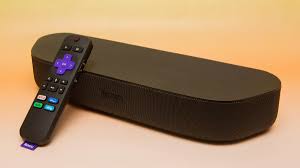
My brother has a Roku Streambar but had difficulty getting it to work reliably. The network connection test reported that both the Wired link and the Internet link were working correctly. However, most of the streaming services wouldn’t start.
As this was tricky to figure out, I’m recording the solution here for the benefit of anyone else with the same problem. (There are quite a few posts on Roku-related forums with similar sounding symptoms.)
The Solution
An old Zyxel D1000 DSL router (supplied by Eir) had been repurposed to use as a Wi-Fi access point in one of my brother’s sheds. This was linked to the main house network via one of its LAN ports. Its built-in DHCP server had been disabled, so its only purpose was to provide Wi-Fi access.
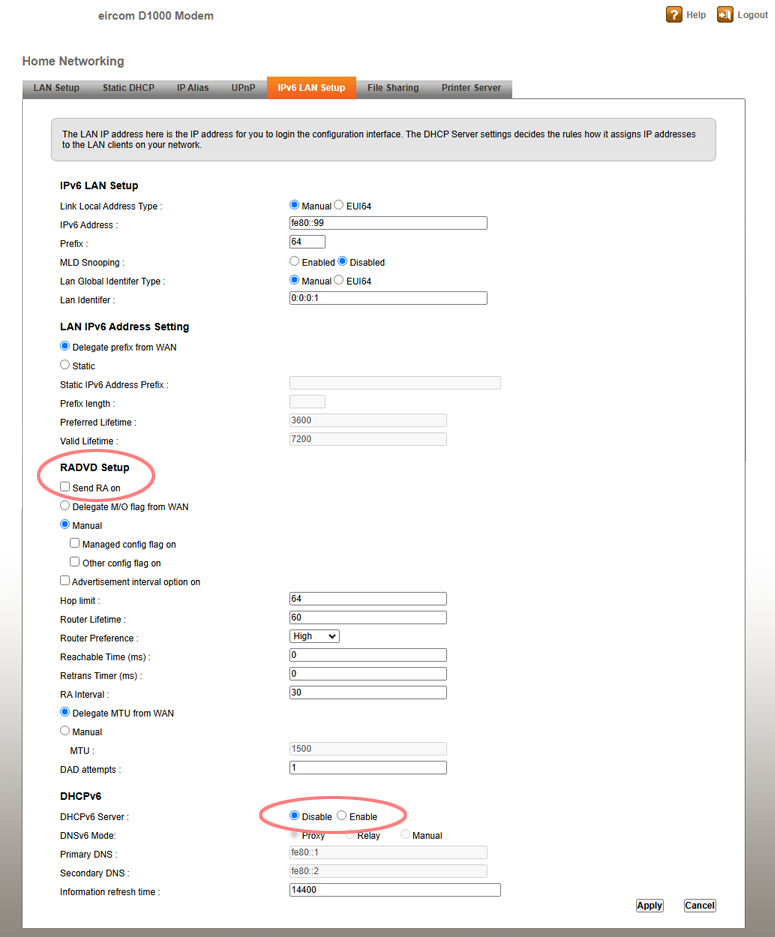
It turns out that this Zyxel model has separate DHCP servers for IPv4 and IPv6 traffic. The IPv4 DHCP server had been successfully disabled, but the IPv6 server, which is configured on a separate page, was still enabled. In addition, IPv6 RA (Router Advertisement) was also still enabled. This meant the Zyxel router was periodically advertising itself as a good place for IPv6 clients to direct traffic. Since the router was no longer directly wired to the Internet, this didn’t work very well.
The solution was to disable both IPv6 DHCP server and IPv6 RA (Router Advertisements) on the Zyxel, and then restart the Roku.
After doing so, the Roku could connect reliably to the Internet once again and streaming services worked as expected. The Zyxel’s IPv6 configuration page looked like this after disabling the relevant IPv6 options:
(It’s also wise to disable the UPnP support on the previous tab, just to ensure it doesn’t confuse any UPnP-aware devices on the same LAN.)
Troubleshooting Approach
If you’re interested in the approach used to diagnose this issue, read on.
My brother’s home networking setup uses a Vodafone 500 Mbps FTTH connection. The Vodafone router provides Wi-Fi access in the main house and is also the main gateway to the Internet. There are four auxiliary Wi-Fi access points located in outhouses and sheds. All of these are wired back to the main router using direct Ethernet links, and all the access points use the same SSID. They all have static IP addresses on the 192.168.1.x network.
The Vodafone router is configured as the main DHCP server for the LAN and provides dynamic IP addresses to the other network devices (PCs, laptops, phones, tablets, Sonos speakers, Smart TVs, Roku Streambar).
The Roku was connected to the network using Wi-Fi; this is the only option for the Streambar out of the box as it does not include an onboard Ethernet port. Initially, I suspected an issue with the Wi-Fi connection due to the Roku’s location. The Wi-Fi connectivity check worked okay, but it seemed prudent to eliminate it.
We added a cheap USB Ethernet port from Amazon and ran a fresh Ethernet cable from the Roku to the nearest network switch. The Roku’s connection test confirmed that this had improved throughput, but it didn’t make any difference to the streaming apps — they still couldn’t connect.
After trying several things, including a full reset of the Roku, I decided to bring it back to my house to continue trouble-shooting. To my surprise, it worked perfectly when connected to my own network. I was able to update the Roku firmware to the latest version and also update the various apps. I ran it for a couple of days to make sure there were no intermittant issues, and it was flawless.
However, when I brought it back to my brother’s house, we were no further on — it still failed to connect.
Network Debugging
This time, I had come armed with my main networking debug tool: a cheap Netgear GS105E managed switch. For around €25, this compact device offers five Gigabit Ethernet ports that are individually configurable. One of the ports can be assigned as a Mirror port, which is ideal for monitoring traffic between two Ethernet devices.
This switch is small enough to fit in my networking toolkit, and I keep it permanently configured so that Port 5 automatically mirrors all the traffic in and out of Port 1. I connect the device being debugged to Port 1, with Port 2 connected to the rest of the network and Port 5 to my Windows laptop. Wireshark running on my laptop can then capture all network traffic in both directions.
(If this approach wasn’t used, Wireshark could see broadcast packets from the device, but most other traffic would be invisible as the network switch or router the device is connected to would transmit the packet directly to the Internet router, bypassing the port Wireshark is connected to.)
You can also use this setup to, for example, monitor all Wi-Fi traffic coming via an access point to the rest of the LAN, or all traffic between LAN devices and the main Internet router – it’s merely a question of where you insert the switch into the network.
For best results, it is a good idea to turn off IPv4 and IPv6 network options on the laptop’s Ethernet adapter; this cuts down on the amount of traffic caused by Windows on the laptop trying to check what is out there.
Analysing The Network Traffic
After inserting the Netgear switch between the Roku and the main LAN, I carried out a simple test: asking the Roku to check for a firmware update. This was consistently failing to connect, and I figured it would generate very little network traffic making it easy to analyse.
Initially, I accidentally created a network loop by forgetting to turn off Wi-fi on my laptop. This caused traffic from the laptop’s Ethernet adapter in promiscuous mode to be broadcast on the Wi-Fi link (I may have enabled routing on my laptop at some point in the past). Over the course of 15 seconds or so, I amassed nearly 1,000,000 packets of network traffic – quite impressive, even if almost all of them were duplicates!
Once I figured that out, and disabled the Wi-Fi temporarily, things settled down and I was able to get a more useful trace. You can download it here if interested:
Initially, I filtered by the Roku’s IP address (192.168.1.34) in order to get rid of unrelated broadcast traffic and what looked like inter-switch advertisement packets. At a first glance, I could see that DNS lookups were failing in what appeared to be an odd way:
The Roku was sending a DNS query for lagrange.sw.roku.com and it appeared the Internet gateway was responding with an appropriate response. However, when that response was delivered to the Roku, it replied with the ICMP error Destination unreachable.
I carefully checked the UDP port numbers on the original request and response packets and they matched correctly, so it seemed odd that the Roku wouldn’t accept something it had asked for a mere six milliseconds earlier!
I did some similar tests without success, and was unable to figure it out. Eventually, as it was getting late, I packed up my gear and headed home — fortunately taking with me a copy of the Wireshark trace so I could analyze it later.
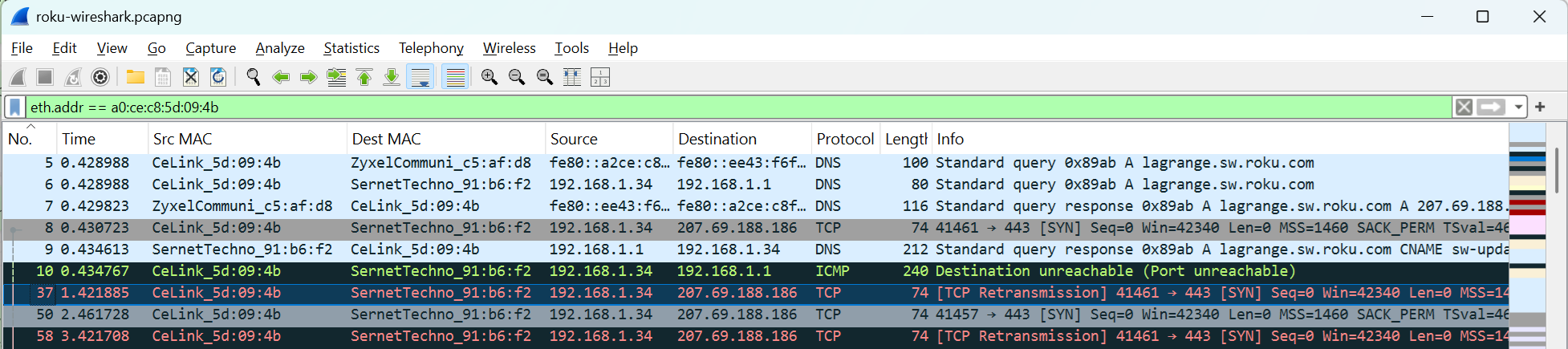
Once home, I took another look. This time, I filtered on the hardware MAC address of the Roku, rather than the IP address:
Aha! The Roku was sending out two DNS queries — one from its IPv6 address, to a Zyxel device, and one from its IPv4 address, to the main Internet router. The Zyxel replied first, giving the IP address 207.69.188.186 as the IP address associated with lagrange.sw.roku.com. As the DNS enquiry had now been satisfied, it no longer needed to wait around for the result of the parallel IPv4 DNS lookup. Hence, the ‘Port unreachable’ error when that result arrived.
Further tests showed that the Zyxel was returning this IP address for any DNS lookup.
What was this Zyxel device? A quick cross-check of its MAC address against the various Wi-Fi access points on the LAN showed that it was in fact an older ADSL D1000 router supplied by Eir, the national Irish phone company & Internet provider. This had provided slow Internet access prior to the long-awaited upgrade to fiber and was now being used to provide Wi-Fi coverage in one of the sheds.
I connected to the Zyxel’s web interface and sure enough, it still had its IPv6 subsystem enabled. I disabled the IPv6 DHCP server expecting that would resolve the issue. However, it did not! It was only after I also disabled the IPv6 RA (Router Advertisement) feature and restarted the Roku that everything finally returned to normal. Finally, it could run streaming applications once more.
Making Sense Of Nonsense
Why did the Internet connection test succeed on the Roku when almost all other Internet access was failing? While I can’t say for sure, I suspect the Roku does an initial connection probe when it starts up. At this point, it has obtained an IPv4 address from the Internet router using DHCP but the Zyxel router has not yet broadcast a Router Advertisement (RA’s are broadcast approximately every 200 seconds).
So, the Roku can connect to its target server on the Internet to verify connectivity without issue, and it then caches the DNS entry it looked up. It re-uses this IP address for further connectivity tests without needing to do another DNS lookup, and as it is an IPv4 address, it uses the IPv4 gateway (the main Internet router) to connect to it.
Within a minute or two of startup, the Roku will have received an IPv6 RA from the Zyxel and it then uses this path for further DNS lookups, in addition to the IPv4 path to the Internet router. As the Zyxel always replies first (within a milisecond or so), that reply beats the one coming from the real Internet. As its reply appears legitimate, the Roku then attempts to connect to 207.69.188.186 and times out when it doesn’t receive the expected response.
So what is this IP address 207.69.188.186? It doesn’t have any connection to the real IP address associated with lagrange.sw.roku.com.
It seems that when the Zyxel has no Internet connection, it serves up this IP address by default as the response for all UDP DNS queries. This has been previously discussed by other Zyxel users, and appears to be an odd quirk of their firmware.
(After some Googling, I discovered that this IP address also appears in example network traces in some of their documentation.)
I was sure I’d heard this IP address before. After checking some old records, I realised it had turned up while I was diagnosing a network connectivity issue with Sky TV for my sister. Her house also had an old Eir D1000 router on the LAN providing Wi-Fi access. I had disabled DHCP access on that router, but had missed the IPv6 configuration. Eventually, a year or two ago, that unit had been replaced by a TP-Link dedicated Wi-Fi device and all the connectivity issues with her Sky TV box had gone away, though I hadn’t made the connection at the time.
So, mystery solved!
In summary, if you arrived here because you were wondering why 207.69.188.186 has appeared on your network traces, track down any Zyxel home routers and reconfigure them or replace them with something more modern.
Bonus Russian Explanation!
The blog post mentioned a couple of paragraphs earlier contains a link to a Russian Zyxel Knowledge Base article that goes into a lot more detail about what is happening here. That page has been offline for more than a decade, but happily archive.org kept a copy. For your convenience it is reproduced here, translated to English courtesy of Google.
Question: When using the P-660R EE modem, the following problem arose:
“When accessing any name, DNS starts returning only www.kimo.com.tw. The modem responds in this way to any request to any server. What is the problem and how can I solve it?”
Answer: First of all, I would like to explain where the need for the address www.kimo.com.tw came from. This is not a hidden Trojan, but a mechanism necessary for implementing the “zero configuration” function.
Here’s how it works:
1. When you try to connect to, say, www.zyxel.ru, the PC sends a DNS query to the modem.
2. If the modem was previously reset to factory configuration, it launches the ” vc-hunting ” mechanism – it goes through the list of VPI, VCI and Internet provider encapsulations built into it until it establishes a logical connection. At this time, www.zyxel.ru is not yet available.
3. At the same time, the modem responds from a fake IP address, as if from “207.69.188.186” (“www.kimo.com.tw”).
4. The PC tries to get an IP address by sending an HTTP request to the modem.
5. The modem, having received this IP address, responds with a corresponding HTML page with a message about the current status of the null configuration process.
This entire process is used only to display the execution of the webredirect function , while there is no real connection to the Internet, i.e. with www.zyxel.ru.If you do not want to use this mechanism, use a new firmware that has the ability to disable it.
Disabling is done via the command line, by establishing a telnet connection to the modem, in menu 24.8, with the following commands:
1. “wan atm vc dis ” (checking the current status of VC hunt and webredirect) 2. “wan atm vc webredir 1/0(1=disable;0=enable) “ 3. “wan atm vc save ” (saving the configuration in non-volatile memory)
Also, don’t forget that the PC has a cache and after you disable the webredirect function, it may still be erroneously routed to “www.kimo.com.tw” for some time until the cache is cleared.
While performing some maintenance and updates on an ancient Windows 2008 Server VM, I upgraded it to Service Pack 2, in an attempt to resolve various ongoing issues.
Shortly afterwards, I discovered Windows Update was no longer working; it gave an obscure failure code and all the usual efforts to revive it, such as flushing the software distribution cache, were unsuccessful. No matter — Windows 2008 Server is out of support anyway, so there are unlikely to be any important updates, right?
Some time later, I discovered that the recently upgraded VPOP3 mail server, running on the same machine, was complaining that it couldn’t access its activation server to verify its license. This wasn’t a critical failure, but it resulted in reduced functionality.
Checking the mail server logs revealed this error message:
“Server certificate verification failed. Connection aborted" Windows code 0x80090302
Hmm. I used Wireshark to monitor the network traffic when VPOP3 started up, and could see it issuing a HTTPS request to the remote activation server. However, the session ended immediately after the initial handshake — clearly something was amiss. I verified that Chrome running on the same machine could access the Activation website successfully; the issue appeared to be with the Windows 2008 SSL libraries.
A check of the Windows Application event log revealed lots of repeated CAPI2 error events every 10 minutes:
Next step was to visit the Applications and Services Logs in Event Viewer, then navigate to Microsoft / Windows / CAPI2 and right-click on the Operational Log to Enable CAPI2 logging. After doing so, a lot more detail about CAPI2 activity started to appear. (It’s a good idea to also increase the CAPI2 log size to 4096 Kb in Properties, as the default 1024 Kb can fill up very quickly.)
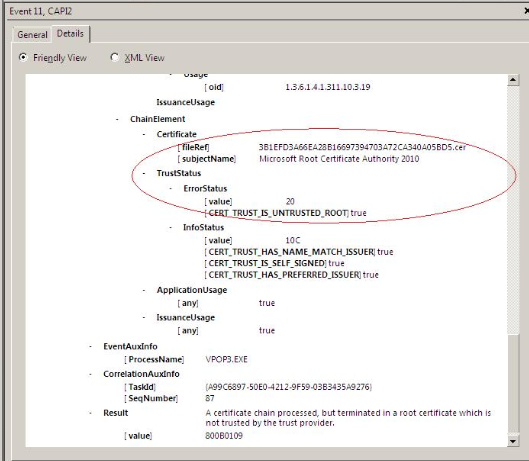
Repeating the activation test with this additional debugging enabled revealed a new error:
Very odd — apparently the Microsoft Root Certificate Authority 2010 was now considered untrusted. Just in case it had become corrupted, I used certmgr.msc to export a copy of this from another, newer machine and import it to the Windows 2008 Server instance, but this made no difference.
After some more research, I discovered John Thaller’s useful Root Certificate Updates For Legacy Windows github repository. Surely this would sort things out? Unfortunately, while it installed without issue, the problem remained.
Eventually, after a lot of further searching, I came across a Microsoft article from 2019 which described a plan to move Windows Update Services from SHA-1 signatures (now considered insecure) to SHA-2. A key part of this plan was that after August 2020, the Windows root certificates would no longer validate SHA-1 signatures, and all Windows Update Services would require SHA-2.
However, Windows 2008 Server SP2 doesn’t actually support SHA-2 verification. No problem – Microsoft were pushing an update that would add the needed SHA-2 support, so once that update was installed ahead of the transition deadline, everything would be good.
Christmas 2023 turned out to be NOT ahead of the transition deadline (missed it by more than three years, in fact) which explains why the server couldn’t access Windows Updates any more. As VPOP3’s Activation server appears to rely on a Microsoft certificate chain for authentication, it too fell victim to the lack of SHA-2 support.
Fortunately, there is a straightforward solution, as Microsoft describe in a follow-up article on How to Update Windows Devices to SHA-2. Microsoft made available a standalone SHA-2 update download page that has the correct installation file for a variety of different scenarios. Pick the one that matches your system, download and install, reboot, and you’re all set.
And indeed, after doing just that, everything started working normally once again!
All’s well that ends well, then. However, I do feel there was a missed opportunity here for the CAP2 logging to be a bit more explicit about the fact that it was the lack of SHA-2 signing support in the OS, or at least the lack of a verifiable signature in the provided certificate, that was the root cause of the failure – that would have saved a lot of time!
As an embedded systems developer working primarily from home, I often need to remotely power-cycle development boards located in the office.
In the past, I’ve used a Denkovi USB Relay 4-port controller with some success. Wiring individual power supplies through this is fiddly though, and It’s not convenient to swap between different power supplies. It does provide a simple Windows GUI to control the outputs however.
I’ve also used a Lindy IPower Switch Classic 8, a network attached power strip which includes an Ethernet port and a built-in web UI to allow any socket to be turned off or on remotely. This works very well but at over £300, it’s a pricey option. Also, it uses IEC C13 sockets (as you might find on a UPS) which don’t work well for connecting standard wall-wart power supplies.
I’ve been looking for a simpler, cheaper solution. Zigbee Smart Plugs are widely available now, and very affordable, so adding a cheap USB Zigbee Controller to my office PC should let me turn them on and off with a simple command line instruction, right?
Of course, it turns out to be a bit more complicated than this. Most online guides recommend installing Home Assistant, an impressive package that can control your whole house. While it can definitely turn on and off a few Zigbee smart plugs, running it under Windows means setting up a Virtual Machine to host it. That seems like a lot of effort and CPU use for such a simple requirement.
Instead, I’ve figured out how to do it with some more basic tools. If you’re trying to do the same, follow along.
Background
Individual Zigbee devices communicate with the Zigbee USB dongle by sending (“publishing”) occasional messages, and receiving (“subscribing” to) messages from other devices or applications. A message broker sits between the devices and applications and co-ordinates these messages. Messages are published to specific topics, which are structured like paths in a filesystem; choosing the correct topic name is how an application targets a message at a particular device.
A key point is that a device does not need to be online when an application sends it a message. Similarly, a device can send a message without the recipient being connected. The broker keeps track of all of this and makes sure any pending messages are delivered the next time the recipient wakes up. This allows ZigBee devices to consume very little power as they don’t need to be constantly awake.
The protocol used for all of this is called MQTT. You’ll config files and diagnostic messages referencing URLs such as mqtt://localhost:1883/ which are used to identify a message broker listening on a particular sever and port. Mosquitto is the message broker we’ll use here; it’s a Windows service that implements the MQTT protocol.
As Mosquitto doesn’t know anything about ZigBee, we need another package to convert between the MQTT messages and raw ZigBee device operations. This package is Zigbee2MQTT.
Hardware
Most Zigbee hardware is well supported by Zigbee2MQTT, so it may pay to shop around. LIDL periodically have Smart Plug offers which reputedly work well. (You may need to replace the proprietary Tuya manufacturer firmware with an Open Source equivalent). For a simple life, I used these plugs from Amazon UK which worked out of the box:
These packages are for Microsoft Windows. They are also available on Linux but you’ll need to adapt the instructions accordingly. I’ve listed the versions I used, but generally, go for the latest public release available in each case.
Node v16.15.0 for Windows x64 – used to provide the environment for ZigBee2MQTT
Mosquito 2.0.14 for Windows x64 – the message broker used to co-ordinate messages sent between applications and Zigbee devices
Zigbee2MQTT-Master – the software bridge that sits between Zigbee devices on the USB dongle and the message broker.
MQTT Explorer – a useful diagnostic tool to explore connected devices and test sending commands to them.
Installation
Run the Node installer. You may wish to click the box for “Automatically install the necessary tools. Note that this will also install Chocolately” but it’s not necessary for this specific application.
Next, run the Mosquitto installer. After installation, you will have a new Windows system service called “Mosquitto Broker”. Start this via the Windows service manager, or from an Administrator command prompt using the command net start “mosquitto broker”. (It will automatically start after a system reboot.)
To install Zigbee2MQTT, visit the Zigbee2MQTT repository page and use the green Code button to download a .zip file of the repository. Extract this to apermanent folder on your local drive where it will live (e.g. C:\Dev\Zigbee). Then open a command prompt, change to this folder and run “npm ci” to setup all the node dependencies.
After installation, edit the config file data\configuration.yaml and ensure it looks similar to this:
# Home Assistant integration (MQTT discovery)
homeassistant: false
# allow new devices to join
permit_join: true
# MQTT settings
mqtt:
# MQTT base topic for zigbee2mqtt MQTT messages
base_topic: zigbee2mqtt
# MQTT server URL
server: 'mqtt://localhost'
# MQTT server authentication, uncomment if required:
# user: my_user
# password: my_password
# Serial settings
serial:
# Location of CC2531 USB sniffer
port: \\.\COM8adapter: deconz
The significant fields are highlighted. permit_join should normally be false but when setting up a new system, set it to true – this allows your smartplugs to pair with Zigbee2MQTT automatically.
Set the port field to the Windows COM device assigned to your USB Zigbee dongle. This may change if you move it to a different USB port so it’s best to always leave it in the same port if possible. The easiest way to identify the COM device is to open Windows Device Manager, expand the Portstree and look at the COM ports that are currently listed. If there are several, unplug the Zigbee Dongle and check which one disappears; then reconnect the Dongle and you will see it reappearing. On my system, it appears as COM8.
The adapter: deconz field is needed when you are using the ConBee II USB dongle; if you are using a different brand, this may not be required. It ensures Zigbee2MQTT uses the right protocol to control the dongle.
After editing the configuration, start Zigbee2MQTT with the command npm start. If this is the first time, it will compile the system; subsequent starts will be faster.
In any case, you should shortly see output similar to this:
Building Zigbee2MQTT... (initial build), finished
Zigbee2MQTT:info  2022-06-15 10:28:57: Logging to console and directory: 'C:\Dev\Zigbee\zigbee2mqtt-master\data\log\2022-06-15.10-28-57' filename: log.txt
Zigbee2MQTT:info  2022-06-15 10:28:57: Starting Zigbee2MQTT version 1.25.2 (commit #unknown)
Zigbee2MQTT:info  2022-06-15 10:28:57: Starting zigbee-herdsman (0.14.34)
CREATED DECONZ ADAPTER
Zigbee2MQTT:info  2022-06-15 10:28:57: zigbee-herdsman started (resumed)
Zigbee2MQTT:info  2022-06-15 10:28:57: Coordinator firmware version: '{"meta":{"maintrel":0,"majorrel":38,"minorrel":114,"product":0,"revision":"0x26720400","transportrev":0},"type":"ConBee2/RaspBee2"}'
Zigbee2MQTT:info  2022-06-15 10:29:10: Currently 0 devices are joined:
Zigbee2MQTT:warn  2022-06-15 10:29:10: `permit_join` set to  `true` in configuration.yaml.
Zigbee2MQTT:warn  2022-06-15 10:29:10: Allowing new devices to join.
Zigbee2MQTT:warn  2022-06-15 10:29:10: Set `permit_join` to `false` once you joined all devices.
Zigbee2MQTT:info  2022-06-15 10:29:10: Zigbee: allowing new devices to join.
Zigbee2MQTT:info  2022-06-15 10:29:11: Connecting to MQTT server at mqtt://localhost
Zigbee2MQTT:info  2022-06-15 10:29:11: Connected to MQTT server
Zigbee2MQTT:info  2022-06-15 10:29:11: MQTT publish: topic 'zigbee2mqtt/bridge/state', payload 'online'
Zigbee2MQTT:info  2022-06-15 10:29:12: MQTT publish: topic 'zigbee2mqtt/bridge/config', payload '{"commit":"unknown","coordinator":{"meta": "maintrel":0,"majorrel":38,"minorrel":114,"product":0,"revision":"0x26720400","transportrev":0},
"type":"ConBee2/RaspBee2"},"log_level":"info","network":{"channel":11,"extendedPanID":"0xdddddddddddddddd","panID":6754},"permit_join":true,"version":"1.25.2"}'
If you have some Smartplugs connected to nearby sockets, and they are in pairing mode (which is the default when they are brand new), they may automatically register. Then you’ll see additional entries like this:
This means that a new device has been registered, and some MQTT topics have been created for it.
Finally, install MQTT Explorer. When it runs initially, you’ll see an MQTT Connection dialog. Use the ‘+‘ icon in the upper left corner to add a new connection called ‘localhost‘ with the Host field also set to ‘localhost‘.
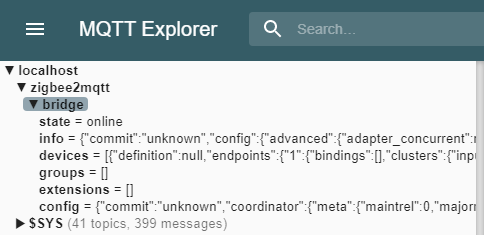
If you open this connection, it will connect to your local Mosquitto broker. On the left, you’ll see a tree view like this:
If you click on the devices line, the right-hand panel will show you the contents. This is a low-level view of the raw data, so it won’t mean too much to you at this point. It’s useful for checking if your devices have registered yet.
Configuration
What next? If you stop Zigbee2MQTT and check its data\configuration.yaml file once again, you may see some new entries at the bottom like this:
These have been automatically added by Zigbee2MQTT during its discover phase. You may like to set the permit_join field to false to stop additional devices registering automatically.
You can edit the friendly_name for each device to something more recognisable. For now, I suggest ‘plug1‘, ‘plug2‘, ‘plug3‘ and ‘plug4‘.
Restart Zigbee2MQTT (‘npm start‘) and now the friendly names can be used to manipulate the plugs.
(If you get an error when restarting Zigbee2MQTT, either your configuration file has an error or you have another copy already running in the background. The console output usually indicates a more precise cause of failure.)
Plug Control
To recap, the Mosquitto Broker service is running in the background, acting as a central message co-ordinator, and Zigbee2MQTT is providing a bridge between Mosquitto and the USB dongle.
All we need now is a way to send messages to the smart plugs to turn them on and off. This is done by publishing messages to special topic names corresponding to the friendly names we assigned earlier.
The quickest way to do this is using MQTT Explorer. When connected to localhost, open the Publish pane on the right-hand side of the main window. Under topic, enter zigbee2mqtt/plug1/set and select json as the data format.
In the text box, enter this json string:
{ "state" : "ON" }
and click Publish. This will set the state attribute of plug1 to ON. The syntax here needs to be precise; both the attribute name and attribute value must be enclosed in double-quotation marks, and they are case-sensitive.
If everything is working, then plug1 should turn on and any connected device will power up. You can repeat this with the state set to OFF or TOGGLE, which should work as expected. Change the topic field to reference plug2, plug3, etc. to control other devices.
This works well for testing but is a little clunky to do on a regular basis. To achieve the same effect from the command line, use the mosquitto_pub tool included with Mosquitto. This is usually found in “C:\Program Files\Mosquitto“.
To turn on plug1 from a DOS command prompt, use this command:
Note the repeated double-quotation marks around “state” and “ON” in the json string. These ensure the quotation marks are not stripped out by the command line parser before they reach mosquitto_pub.
This command and similar variations can be easily encapsulated in a small batch file to automate things further. Here is a script called resetplug.cmd to reboot a device connected to a specific plug:
@echo off
set DELAY=3
set MQTTPUB="C:\Program Files\Mosquitto\mosquitto_pub.exe"
if not z%1==z goto action
echo "Usage: resetplug <plugname> [ <delay> ]"
goto done

:action
echo Resetting %1...
set PLUGPATH=zigbee2mqtt/%1/set
if not z%2==z set DELAY=%2
%MQTTPUB% -h localhost -t "%PLUGPATH%" -m "{ ""state"" : ""OFF"" }"
timeout /t %DELAY% >nul
%MQTTPUB% -h localhost -t "%PLUGPATH%" -m "{ ""state"" : ""ON"" }"

:done
You can then use the command “resetplug plug1” to reset the device connected to plug1. For devices needing a longer reset period, add an optional delay, e.g.”resetplug plug3 5“.
After issuing these commands, you will notice additional topics appearing in the MQTT Explorer view. If you click on these topics, you can see the state of the plug changing in realtime. (This is useful if you are debugging more complex control scenarios.)
Conclusion
Following these simple steps makes it easy to control smart plugs from the command line. You’ll need to manually start Zigbee2Mqtt if you reboot your PC, or more sensibly, create a batch file to do this and add it to your Windows Startup folder.
If you add additional smart plugs in the future, just set permit_join to true in configuration.yaml temporarily to allow the plugs to register, then add a suitable friendly name and you’re all set.
With luck, you’ll never need any of the information below. If you do then (a) you have my sympathy, and (b) you’re welcome!
One of my clients has an aging Microsoft IIS installation comprising a variety of Windows 2000 & 2003 servers (SQL, IIS, Domain Controller, File Server, Linux VMWare) running on a mixture of Dell server hardware.
The main IIS installation runs on Windows 2000 Server on a Dell Poweredge 1950 using a Dell SAS 5/iR disk controller, to which are connected two SATA drives running independently (not RAID-ed). In July, the controller card failed catastrophically, rendering the server useless.
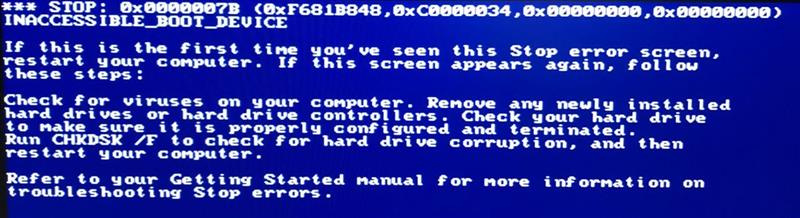
Fortunately, though this is old hardware, we were able to source a replacement controller card on eBay. Less fortunately, when I installed the new controller and attempted to boot from it, the server crashed a few seconds after displaying the Win2K splash screen with the dreaded blue screen of death:
Not great. After some investigation, I realised that though the replacement looked identical in all respects to the failed card (even the discrete components were positioned identically on the PCB), it had a slightly newer BIOS. This, it appeared, was sufficient for Windows to treat the controller card as a new, unrecognised device.
If you have to replace a disk controller on a Windows server, the usual advice is to install the new controller first, allow Windows to detect it, install any needed drivers, then — and only then — shut down, remove the old controller, and connect the hard drives to the new controller. Windows then has the needed drivers installed to allow it to boot Windows successfully.
Of course, in this scenario we didn’t have that luxury – the old controller was dead, so Windows wouldn’t boot at all. We needed to somehow install the updated drivers on the Windows system disk offline.
This turned out to be … tricky! Here are a few of the things I tried before figuring it out. (Needless to say, I copied the disk onto a fresh drive and performed my experiments on the copy. This ensured the original was always available if I needed to start over.)
1. Update controller drivers – FAIL
I downloaded updated drivers for SAS 5/iR controller from Dell’s website (here), extract drivers, manually copy driver files to Windows c:\winnt\system32\drivers folder, overwriting the older versions with the same name. This made no difference at all.
Then I discovered the C:\WinNT\NLDRVS sub-folder which holds the core third-party drivers used by Windows before the whole plug & play subsystem is up and running. This contains a series of numbered sub-folders, one for each driver. Again, I updated this to use the latest versions of the driver files, and again it made no difference.
2. Repair Windows Installation – FAIL
Next, I attempted a Windows 2000 repair, which was a lot harder than I expected.
After tracking down the original Windows 2000 installation CD, I was unable to press F6 to install additional drivers from floppy (remember that?) because the PowerEdge 1950 has no floppy drive. Windows won’t recognise a USB flash drive at this point either.
There are hardware floppy emulators around that will accept a USB memory stick and present the contents as a floppy drive using the old 34-pin floppy cable standard. Unfortunately, the PowerEdge doesn’t have an internal header to connect such a device to. You can also buy floppy drives with a USB interface but I didn’t have one of those to hand (or any floppy disks to use with such a device).
Eventually, I discovered nLite, an excellent utility that lets you build a custom Windows installation CD which includes your selection of third-party drivers, service packs, and other customisations. I also found WinSetupFromUSB which lets you install a Windows installation CD on a USB stick in such a way that even the Windows 2000 Installer can successfully boot from it. (Some deep magic is used to make this work).
Between these, I was able to create a slip-streamed Windows 2000 SP4 installation CD with the latest Dell SAS 5/iR drivers pre-installed. Booting with this, I could get to the Repair Windows menu, find my Windows installation, and let the automatic repair try and fix it.
This was also unsuccessful – the automatic repair didn’t notice that the drivers it had booted with were different to the ones pre-installed on the original Windows disk, so it didn’t update them.
3. Perform an in-place Windows upgrade – Partial Success
By now, having spent a lot of effort trying various things, I figured there was only one thing for it – perform an in-place upgrade of Windows 2000 using the process outlined by this TechRepublic article. This is essentially a new Windows installation on top of the existing install. Windows is smart enough to replace the system files with fresh versions while preserving all existing third-party software and user profiles.
In principle, this allows you to resolve any hardware-related Windows glitches without having to re-install all your application software. This sounded good, because the mission-critical software running on this particular server is complex and the original designers and implementers were long since gone, leaving no documentation behind them. Recreating it from scratch on a clean Windows installation would have been unthinkable.
The re-install process went smoothly, albeit slowly, and once completed, Windows booted successfully. Hurray! Job done, right?
Well, not quite. The original installation had somehow ended up with the WINNT folder on E:\ while the tiny 2 GB FAT16 boot partition was on C:\. After the re-install, WINNT was located on C:\, along with Program Files and other system folders. This, of course, broke lots of things.
I was able to fix most of them by adding a scheduled task to SUBST drive E:\ to drive C:\ at startup, which made most of the system much happier. A few services started before this remapping occurred, and I located those in the Registry and updated their path references by hand. Yes, this is all ugly and horrible, but by this point, I just needed to get things working by any means!
(Word to the wise: be careful with removable USB backup drives, which usually grab the first available drive letter. If that happens to be E:, it stops the drive letter mapping working correctly and you’re back to square one.)
Microsoft Office was still a little unhappy, but became much happier after I carried out a Repair Install. I also had to re-assign appropriate drive letters to some of the data partitions.
Finally, after all of this …. IIS started correctly, websites were accessible, and all was right with the world! Hurray, again!
4. When is a success not a success?
Not so fast. One of the critical components of the website was the ability to upload formatted Word documents which were then automatically converted to XML for processing by the content management system. This wasn’t working correctly; in fact, it wasn’t working at all.
The issue seemed to be related to a custom COM object that had been developed for the project, and a method in this object was failing during the conversion of the Word document. Everything I could see indicated it was somehow connected to the Microsoft Office installation (since presumably Word itself was involved in the conversion).
I spent more than a week trying to get to the bottom of this. I re-registered all COM objects and relevant DLLs, checked the system and application logs for errors, enabled IIS debugging, etc – all the usual things you would expect. When I dug deeper, using Microsoft’s ProcMon tool, the issue seemed to be related to an instance of Internet Explorer that was launched during the conversion.
After many hours pouring over ProcMon, IIS and Event logs, checking for unexpected failures buried in the midst of the many, many expected failures, I had to admit defeat. The server was working, but it wasn’t working reliably. It also had a tendency to hang random services during startup, and Windows Update refused to start, neither of which inspired confidence.
5. The Easy Way
By this stage, and with the client’s patience starting to reach its limits, I decided to use the knowledge gained working through the above to have another go, starting from scratch with the original disk again.
A chance remark on a discussion forum about SCSI adapter BIOS signatures being used by Windows to help identify the correct drive led me to a rarely visited part of the Windows 2000 registry known as the CriticalDeviceDatabase.(This no longer exists on modern versions of Windows).
Further research brought me to Michael Albert’s invaluable page on manually adding a mass storage device to an existing Windows installation. As one commenter rightly said, “Never delete this page!” The information it contains is invaluable, and not easily found elsewhere. So, thank you Michael!
The registry key HKEY_LOCAL_MACHINE / System / Control / CurrentControlSet / CriticalDeviceDatabase contains a series of sub-keys for all the devices needed to boot Windows. Third-party controller cards are referenced here by their PCI vendor, device and (crucially) subsystem code.
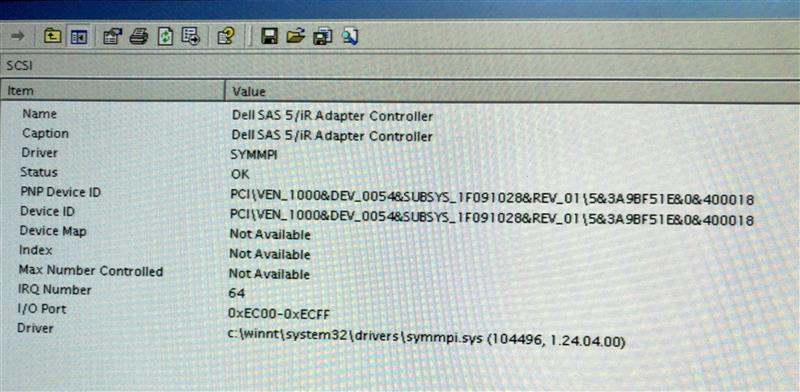
First, I needed to get the PCI code for the SAS 5/iR controller. On most Windows installations, you can visit Device Manager, open the Properties pages for the controller, and under the Details pane select Hardware IDs. However, on Windows 2000 this information isn’t so easily available. Instead, you need to run MSINFO32 and find the controller there, usually under SCSI devices.
When I ran MSINFO32 on my flakey Windows re-installation, the SAS 5/iR entry looked like this:
Checking Regedit on the same machine, I could see the following matching entry in the registry:
The only difference is the subsystem code, which has changed from 0x1f061028 to 0x1f091028. I concluded that the additional entry was the one used by the old controller card, and that it had survived the in-place Windows upgrade. For reasons best known to themselves, Dell must have revised the sub-function code when they updated the controller’s BIOS, possibly to provide an easy way for the driver to identify hardware with additional capability or some obscure hardware fix.
I went back to the original disk and copied the registry System hive from \WINNT\SYSTEM32\CONFIG\SYSTEM to my work computer, then loaded it into RegEdit by selecting HKEY_LOCAL_MACHINE, then using Load Hive and entering a temporary sub-key name (W2K-Recovery) to allow me to access it.
Drilling down there, I could see registry keys for ControlSet001 and CurrentControlSet002 but no CurrentControlSet. This is normal when editing an offline registry hive — CurrentControlSet is created dynamically by the operating system but is not part of the hive itself. Instead, I checked under the Select key which confirmed that the ‘Current‘ selection was set to 1 (indicating CurrentControlSet001). And sure enough, under CurrentControlSet001 / Control / CriticalDeviceDatabase, there was an entry for subsystem 0x1f061028 but not 0x1f091028.
I made a fresh clone of the original Windows drive, then manually added the CriticalDeviceDatabase entry for 0x1f091028 without changing anything else. (Again, I performed this by loading the System hive offline into RegEdit on my main work PC, making the modifications, then unloading it again and copying it back to the WINNT folder on the target disk.)
After this, the new drive booted straight into Windows with no issue. As it was the original Windows installation, everything was back to exactly the way it was before the disk controller died.
As with everything Windows related, an ounce of knowledge is worth a pound (or stone!) of experimenting! If you’ve made it this far, hopefully the information above will save you some wasted time and effort.
My development PC from five years ago was relegated to secondary status when I upgraded. Now it acts as my main backup server for the network, and also an occasional disk copy station when I want to copy or recover drives without disrupting my main machine.
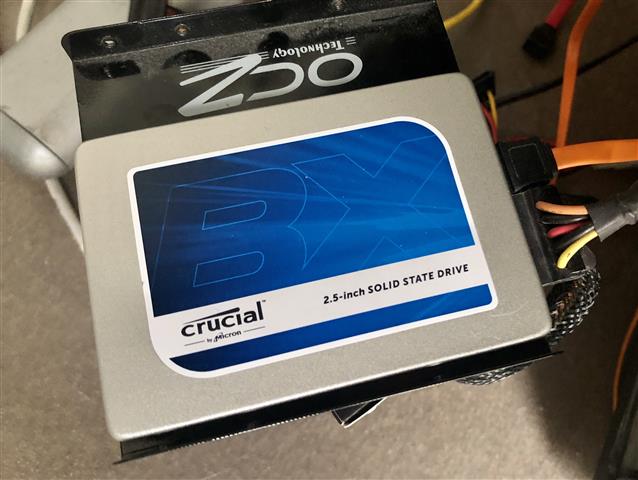
It uses a Crucial CT500BX SSD as its C: drive and over the past few months this has been acting up — occasionally after installing Windows updates and rebooting overnight, the system would report no boot drive available. This was a minor pain since it would sometimes take several days before I noticed, during which time nightly backups weren’t taking place. It would always come back correctly when I went into the BIOS and reselected the correct boot device.
A few days ago, however, it stopped working entirely and no amount of coaxing would bring it back to life. I was at the point of just giving up, when I stumbled across a recovery technique that was I hadn’t seen before. I tried it, and it worked!
The trick is to unplug power & data cables from the SSD, then connect power-only and let it sit for 30 minutes. Then disconnect power for 30 seconds, reconnect it, and leave it for another 30 mins. Finally, power everything down, connect both power and data cables, and if all is well, then your drive will be working again.
So, what’s going on? It seems that most SSDs have a built-in failsafe which kicks in after 30 minutes without any data activity. This will scrub any internal cache, return various settings to default, and generally put the drive back to a known good starting state. Crucially, it does this without affecting your drive’s data.
How does the drive get into this bad state? It’s unclear, but may occur if you shut it down while it’s in the middle of an internal update operation; another factor may be its internal garbage collection, which erases data blocks that are no longer in use, to have them free for the next write operation — if a drive is running close to full, the garbage collector may be working overtime and could eventually get itself into a knot.
Regardless of the cause, I was sceptical – but it worked! It’s easy to try, and a good trick to have in your arsenal.
A good description of the precise procedure is on David Farquhar’s blog. Crucial themselves outline a similar process on their SSD FAQ. Once you know what to look for, there’s plenty of other discussion about this online too.
However, I’ve finally found a way to make a statically configured default route properly persistent across reboots (something that other operating systems, and older versions of Windows, have no trouble doing at all).
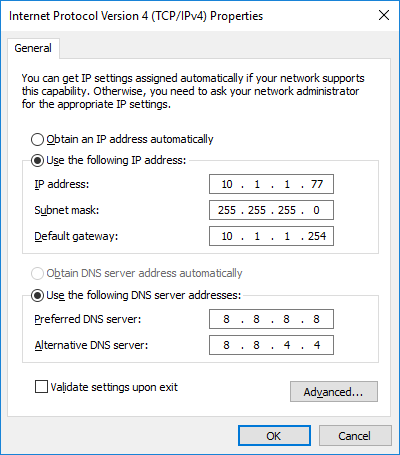
To recap: for various reasons, I assign static IP addresses to most of my PCs instead of using DHCP to allocate them automatically. As part of the configuration I specify a default gateway to the Internet, like this:
Windows 10 appears unable to remember this default gateway across reboots, especially when I have additional IP subnets configured on the same network interface.
This isn’t a big deal if I’m sitting in front of the PC, since I can fix it quickly. However, it’s a show-stopper if I need to access the PC remotely since it is no longer connected to the Internet. When it happens with our main family PC, it’s even more annoying since the steps to resolve it are not intuitive for my wife and sons.
Today, after yet another such unplanned outage (thank you, Windows Updates), a lightbulb finally went off in my head — why not use the existing Windows Persistent Route capability to add a persistent default route? I’ve now tried this approach on several PCs and it seems to work reliably!
So without further ado, if you too are suffering from this problem, here’s how to fix it.
Open a command prompt with Administrator privileges by right-clicking on the Command Prompt option and selecting Run As Administrator, or pressing <WindowsKey>-<R>, typing CMD in the Run box, and pressing <CTRL>-<SHIFT>-<Enter>
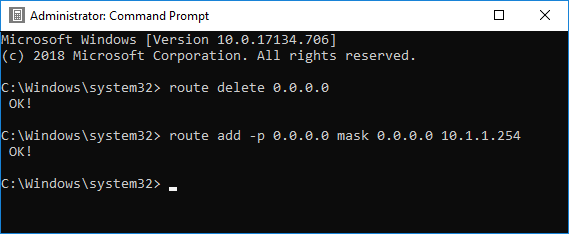
Type ROUTE DELETE 0.0.0.0 to delete any existing default route; if you don’t have one at the moment, this will give an error which is fine.
Type ROUTE ADD -p 0.0.0.0 MASK 0.0.0.0 10.1.1.254 to add a new default route using the IP router gateway 10.1.1.254; replace this with your own gateway IP.
That’s it! Your default route should now be added back automatically whenever you reboot. If you need to change to a different default route, just repeat the steps above.
A number of my PCs have a persistent problem with the default route disappearing when the system is restarted. Since I use Remote Desktop to control most of these machines remotely, it’s rather annoying; if the PC reboots, I no longer have remote access.
I hoped it would correct itself when I upgraded to Windows 10, but it’s still happening. In fact, it’s much worse — Win10 feels it has carte blanche to reboot to install upgrades without asking my permission first and when it does, I have to visit the PC to reset the default route, or find someone to do it for me.
This all started a year or two ago, with a particular Windows 7 update (I’m not sure which one). The only common factor is that all the affected PCs use static IP addresses with a manually configured default route. It doesn’t occur when DHCP is used. Most of them also have multiple network adapters.
While I have a workaround using a startup script to manually re-add the missing route, it’s awkward to run this with the elevated command privileges needed to change the default route.
Google suggested various solutions, including:
Editing the network adapter and switching it to DHCP, exiting, then going back in and switching it to static again. This needs to be done twice to work.
Resetting the TCP/IP stack (by running netsh int reset from an elevated command prompt). This is quite drastic.
I tried both of these but neither fixed it for me.
Today, I found something that *did* work. I’m recording it here in case it helps someone else.
Run RegEdit and navigate to Computer\HKEY_LOCAL_MACHINE\System\CurrentControlSet\Services\Tcpip\Parameters\Interfaces
Go through each of the interface GUIDs in turn.
One of them will have an IPAddress field matching your main network interface. On this one, confirm that there is a REG_MULTI_SZ field called DefaultGateway containing a single text line with the IP address of your default route. If it’s not there, create it. Similarly, there should be a DefaultGatewayMetric field, also REG_MULTI_SZ, containing the single string ‘0’.
On all the other interface GUIDs, delete any DefaultGateway and DefaultGatewayMetric fields entirely.
After completing these steps, restart your PC. The correct default route should now be configured.
Ireland’s new postcode scheme, Eircode is officially launched today. It’s been a long time coming and like it or lump it, we’ll all be using it soon.
There’s been plenty of debate and criticism of Eircode in recent months, some of it valid, some of it misplaced. However, I did read one thing that caught my attention — the suggestion that Eircode was impractical for use with portable GPS navigators because the full country-wide database would require 2 GB storage and exhaust their flash storage.

 There’s been plenty of debate and