Short version: does shift-selecting blocks of text in Visual Studio, Word, Outlook, Notepad or other Windows apps mysteriously cancel your selection from time to time? The problem may be to do with your keyboard’s PS2 to USB adapter. Skip to the end for an easy fix.
I spend a lot of time editing text. Sometimes, this is in Word or Vim, but mostly it’s in Visual Studio’s code editor. So, when something I’m used to breaks, something I do so often that it’s hard-wired into my fingers, it gets my attention.
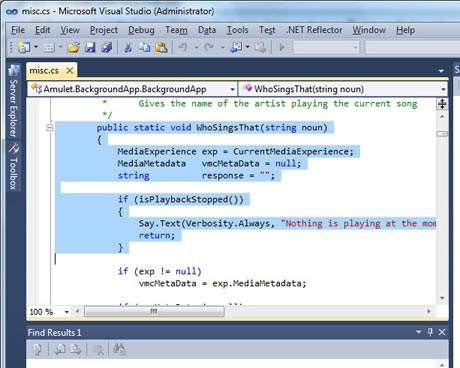
I often select blocks of text by holding down Shift, holding Cursor Down until the block of text has been selected, and then pressing Cursor Up to move back up a line or two. When I’m working quickly, I often press Cursor Up before releasing Cursor Down. And until recently, this would work perfectly – the Cursor Up stroke would take precedence over the repeating Cursor Down and things would smoothly come to a halt.
I started a new project recently which needed Visual Studio 2010 (I’d been using VS2008 until then). I installed VS2010 on a fresh development PC and pretty quickly noticed that whenever I tried to select a block of text, it would end up unselected again. Selecting it a second time, more carefully, worked fine. During periods of heavy editing, I might do this operation several times a minute, so this was DEEPLY AGGRAVATING.
I figured out that things worked fine as long as I released Cursor Down before pressing Cursor Up while making the selection. Unfortunately, training my fingers to do this was a lot harder than I expected, so the problem continued. Since I was only working on the VS2010 PC a couple of days a week, I was able to live with it. I checked Google, of course, but nobody else seemed to be suffering from this problem. I even used the Spy++ development tool to monitor keyboard messages going to the Visual Studio window, but nothing seemed amiss.
Over Christmas, I rebuilt my home office, incorporating some new monitors, KVMs, moving things around, etc. Soon after, I noticed the problem had spread to my main development PC. Worse, it turned out that applications other than Visual Studio were now being affected. Even Visual Studio 2008, which had been fine up until now, was suffering, as was Notepad, Outlook, and pretty much any application that accepted multi-line text input!
What was going on here? I checked a couple of my other PCs — some of them were doing it, some of them not. Was this some sort of strange new virus with an unanticipated side-effect? Several full virus checks (all clean) suggested not. Both Windows 7 and Windows 8 systems were showing the problem, but I had other similar systems that were clear, as was Windows 2012. More intriguingly, when I connected to an afflicted system using remote desktop, the problem vanished. I even considered the issue might be related to a keyboard switch I was using to share a single keyboard & mouse between several PCs, but where I had such a setup, some of the PCs on the switch were fine, others were not.
At this point, I reckoned the cause must be some system utility I had installed on some but not all of the PCs, or possibly a Windows update. An audit of all such software didn’t point to any culprits, however. And the problem continued to sit there, annoying the heck out of me on a daily basis.
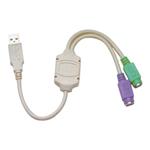
Until finally, today, a break-through! I decided to connect an old PS/2 keyboard to my main PC at the same time as the USB KVM switch I was using day-to-day — and using the old keyboard, the problem didn’t occur! I then connected the PS/2 keyboard to a USB port, using a cheap PS2 to USB adapter, and the problem returned. It was something to do with the KVM after all.
The next step was to go back to Spy++ again and do some A/B comparisons. I used Notepad as my test application — it’s so simple that I figured there would be very little noise to get in the way. (I briefly had no output from Spy++, until I realised it could only monitor 32-bit applications on my Win7/64 PC; I fixed this by copying the 32-bit version of Notepad.exe across from a Win7 x86 system and monitoring that.)
Here’s the pertinent output, showing the key sequence SHIFT, Down (held down to repeat several times), Up, release Down, release Up.
First, with the keyboard connected via USB:
P WM_KEYDOWN nVirtKey:VK_SHIFT cRepeat:1 Code:2A fExtended:0 fAltDown:0 fRepeat:0 fUp:0
P WM_KEYDOWN nVirtKey:VK_SHIFT cRepeat:1 Code:2A fExtended:0 fAltDown:0 fRepeat:1 fUp:0
P WM_KEYDOWN nVirtKey:VK_SHIFT cRepeat:1 Code:2A fExtended:0 fAltDown:0 fRepeat:1 fUp:0
P WM_KEYDOWN nVirtKey:VK_DOWN cRepeat:1 Code:50 fExtended:1 fAltDown:0 fRepeat:0 fUp:0
P WM_KEYUP nVirtKey:VK_DOWN cRepeat:1 Code:50 fExtended:1 fAltDown:0 fRepeat:1 fUp:1
P WM_KEYDOWN nVirtKey:VK_DOWN cRepeat:1 Code:50 fExtended:1 fAltDown:0 fRepeat:0 fUp:0
P WM_KEYUP nVirtKey:VK_DOWN cRepeat:1 Code:50 fExtended:1 fAltDown:0 fRepeat:1 fUp:1
P WM_KEYDOWN nVirtKey:VK_DOWN cRepeat:1 Code:50 fExtended:1 fAltDown:0 fRepeat:0 fUp:0
P WM_KEYUP nVirtKey:VK_DOWN cRepeat:1 Code:50 fExtended:1 fAltDown:0 fRepeat:1 fUp:1
P WM_KEYDOWN nVirtKey:VK_DOWN cRepeat:1 Code:50 fExtended:1 fAltDown:0 fRepeat:0 fUp:0
P WM_KEYUP nVirtKey:VK_SHIFT cRepeat:1 Code:2A fExtended:0 fAltDown:0 fRepeat:1 fUp:1
P WM_KEYDOWN nVirtKey:VK_UP cRepeat:1 Code:48 fExtended:1 fAltDown:0 fRepeat:0 fUp:0
P WM_KEYUP nVirtKey:VK_UP cRepeat:1 Code:48 fExtended:1 fAltDown:0 fRepeat:1 fUp:1
P WM_KEYUP nVirtKey:VK_DOWN cRepeat:1 Code:50 fExtended:1 fAltDown:0 fRepeat:1 fUp:1
Now the same sequence, using the PS/2 keyboard connected directly to the PS/2 port:
P WM_KEYDOWN nVirtKey:VK_SHIFT cRepeat:1 Code:2A fExtended:0 fAltDown:0 fRepeat:0 fUp:0
P WM_KEYDOWN nVirtKey:VK_SHIFT cRepeat:1 Code:2A fExtended:0 fAltDown:0 fRepeat:1 fUp:0
P WM_KEYDOWN nVirtKey:VK_SHIFT cRepeat:1 Code:2A fExtended:0 fAltDown:0 fRepeat:1 fUp:0
P WM_KEYDOWN nVirtKey:VK_DOWN cRepeat:1 Code:50 fExtended:1 fAltDown:0 fRepeat:0 fUp:0
P WM_KEYDOWN nVirtKey:VK_DOWN cRepeat:1 Code:50 fExtended:1 fAltDown:0 fRepeat:1 fUp:0
P WM_KEYDOWN nVirtKey:VK_DOWN cRepeat:1 Code:50 fExtended:1 fAltDown:0 fRepeat:1 fUp:0
P WM_KEYDOWN nVirtKey:VK_DOWN cRepeat:1 Code:50 fExtended:1 fAltDown:0 fRepeat:1 fUp:0
P WM_KEYDOWN nVirtKey:VK_UP cRepeat:1 Code:48 fExtended:1 fAltDown:0 fRepeat:0 fUp:0
P WM_KEYUP nVirtKey:VK_UP cRepeat:1 Code:48 fExtended:1 fAltDown:0 fRepeat:1 fUp:1
P WM_KEYUP nVirtKey:VK_DOWN cRepeat:1 Code:50 fExtended:1 fAltDown:0 fRepeat:1 fUp:1
P WM_KEYUP nVirtKey:VK_SHIFT cRepeat:1 Code:2A fExtended:0 fAltDown:0 fRepeat:1 fUp:1
There are two significant differences: the USB input seems to repeat keys by continually releasing and re-generating the keystroke (even though I had the Down key held down continually); more significantly, it generates an up-stroke for the Shift key as soon as I press Cursor Up (or indeed any other key, I discovered), before generating the Up keystroke — essentially, the keyboard was not supporting N-key-rollover when connected via USB.
This second point is what was causing the problem, since if you select a block of text using Shift and then press Up on its own, it does indeed cancel the selection.
Okay, so now we have the cause – how to fix it? I knew from previous testing that a genuine USB keyboard didn’t seem to exhibit this problem, so it must be something to do with my PS2 to USB adapter (actually, two different types, both with the same problem). I speculated that it might have something to do with the keyboard repeat speed — perhaps Windows was simulating repeated keys in the USB driver if it thought the attached keyboard couldn’t handle this itself, or perhaps the PS/2 keyboard’s repeated codes were being remapped by the USB converter cable.
Next stop was to Control Panel -> Keyboard -> Speed where I tried setting the keyboard repeat speed to both its slowest and fastest setting. Amazingly, either setting fixed the problem completely! It seems that all you need to do is set the repeat speed to something other than the default; this magically makes things start behaving properly.
To confirm, I repeated my test with Spy++ and sure enough, the USB-connected keyboard is now correctly sending repeated KEY_DOWN codes and no longer sending a KEY_UP for Shift in advance of the Up keystroke being pressed. My guess is that this is a quirk of the built-in Windows USB keyboard driver, rather than something in the device itself, since identical behaviour occurred with two separate PS2 to USB converters.
So problem solved: I had adjusted the keyboard speed setting on some of my PCs, but not on others which is why the problem appeared to be so random.
 There are many reasons for choosing Snoopdos. Our team of experts combines highly communicative people with varied skills in a wide range of sectors which means we have a wealth of knowledge and creativity to offer you. We have collaborated internationally with great success. Our scope spans all kinds of projects for companies of all sizes. We can devise a program with which to achieve your goals. Take your business to the next level with our help!